iBuyPower Slate: Gaming-First Desktop Delivers Strong Frame Rates, Weak Productivity Chops
The $1,999 iBuyPower Slate pairs a Ryzen 7 7700X3D with an RTX 5070 in a stylish RGB chassis and throws in mechanical peripherals, but its CPU lags behind Intel rivals in non-gaming workloads.
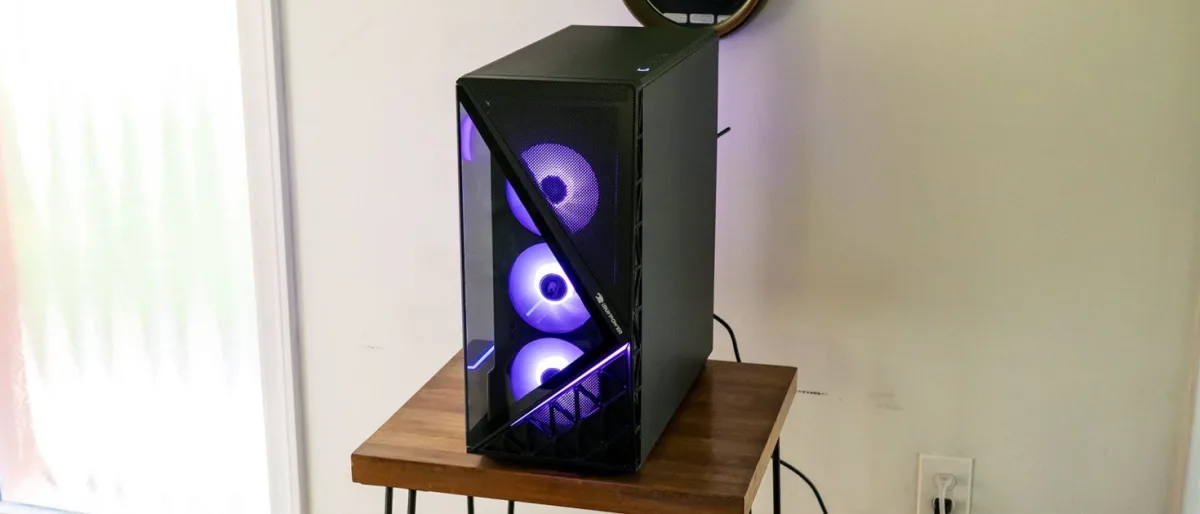
At $1,999, the iBuyPower Slate bundles together an RTX 5070 graphics card, a Ryzen 7 7700X3D processor, a 360mm liquid cooler, and a tempered-glass mid-tower with abundant RGB lighting. The system distinguishes itself further by including gaming peripherals—a mechanical keyboard and mouse—that feel like genuine additions rather than token inclusions.
Yet the mid-range desktop market has grown crowded, and gaming performance alone may not justify the price when competing systems offer more balanced capabilities at comparable costs. The central question becomes whether the Slate's gaming-focused design warrants its asking price against alternatives that excel across broader workloads.
Design and Physical Layout
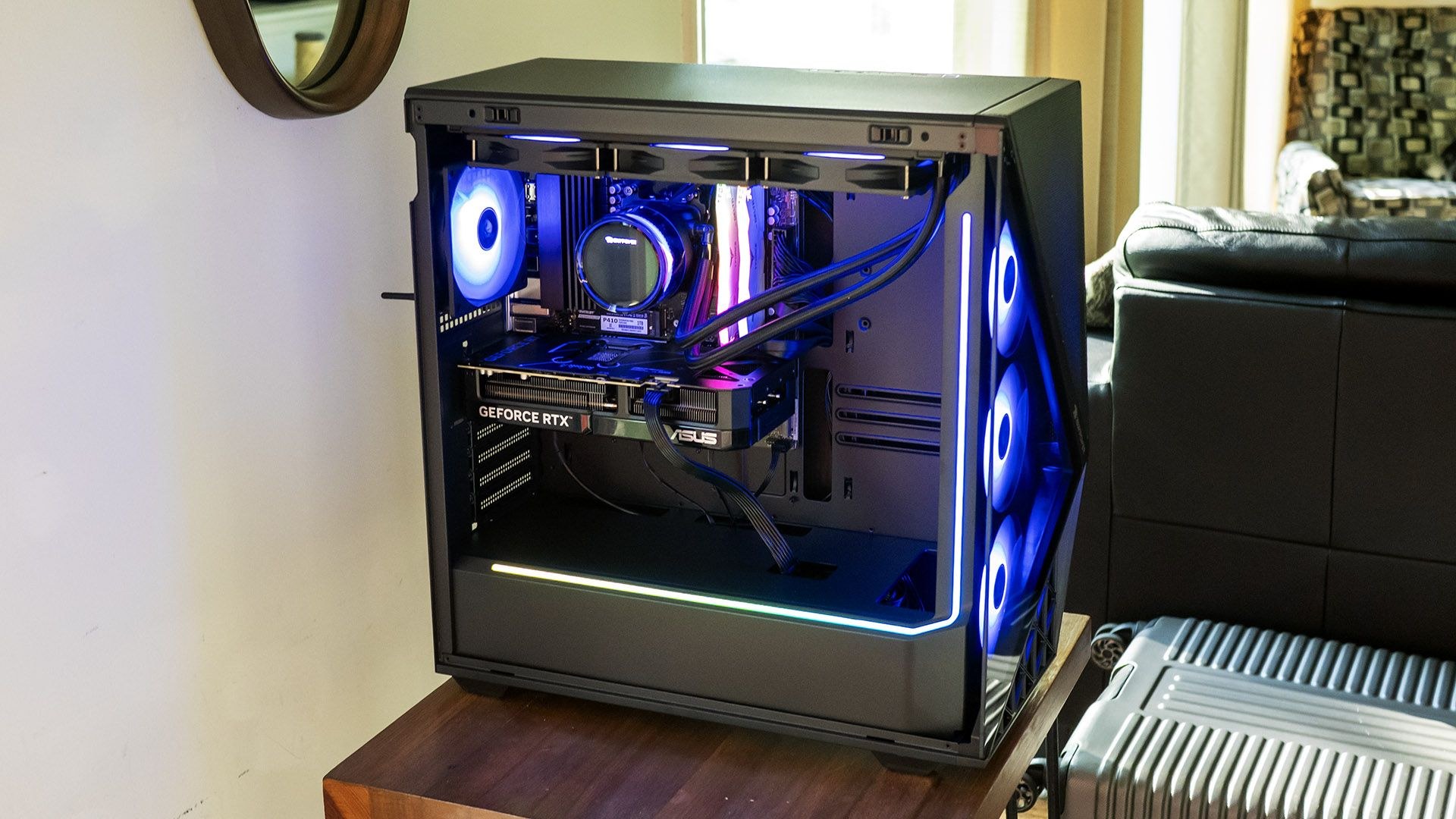
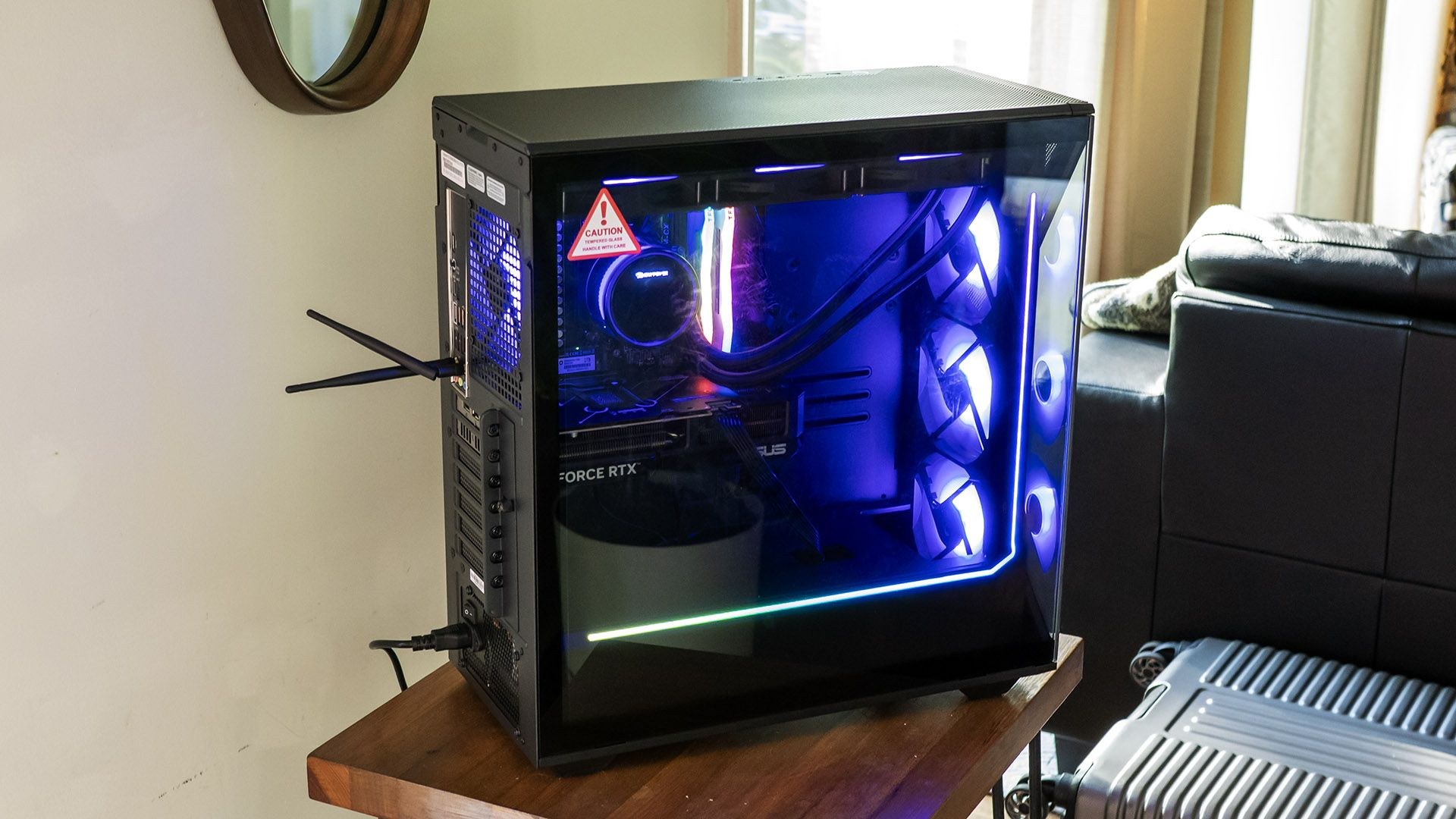
The Slate unmistakably announces itself as gaming hardware. A full-view tempered glass side panel exposes the internals, while the front features a triangular glass panel partially revealing three 120mm RGB fans. Measuring 8.7 x 19.3 x 19.5 inches, the tower occupies the mid-size category.
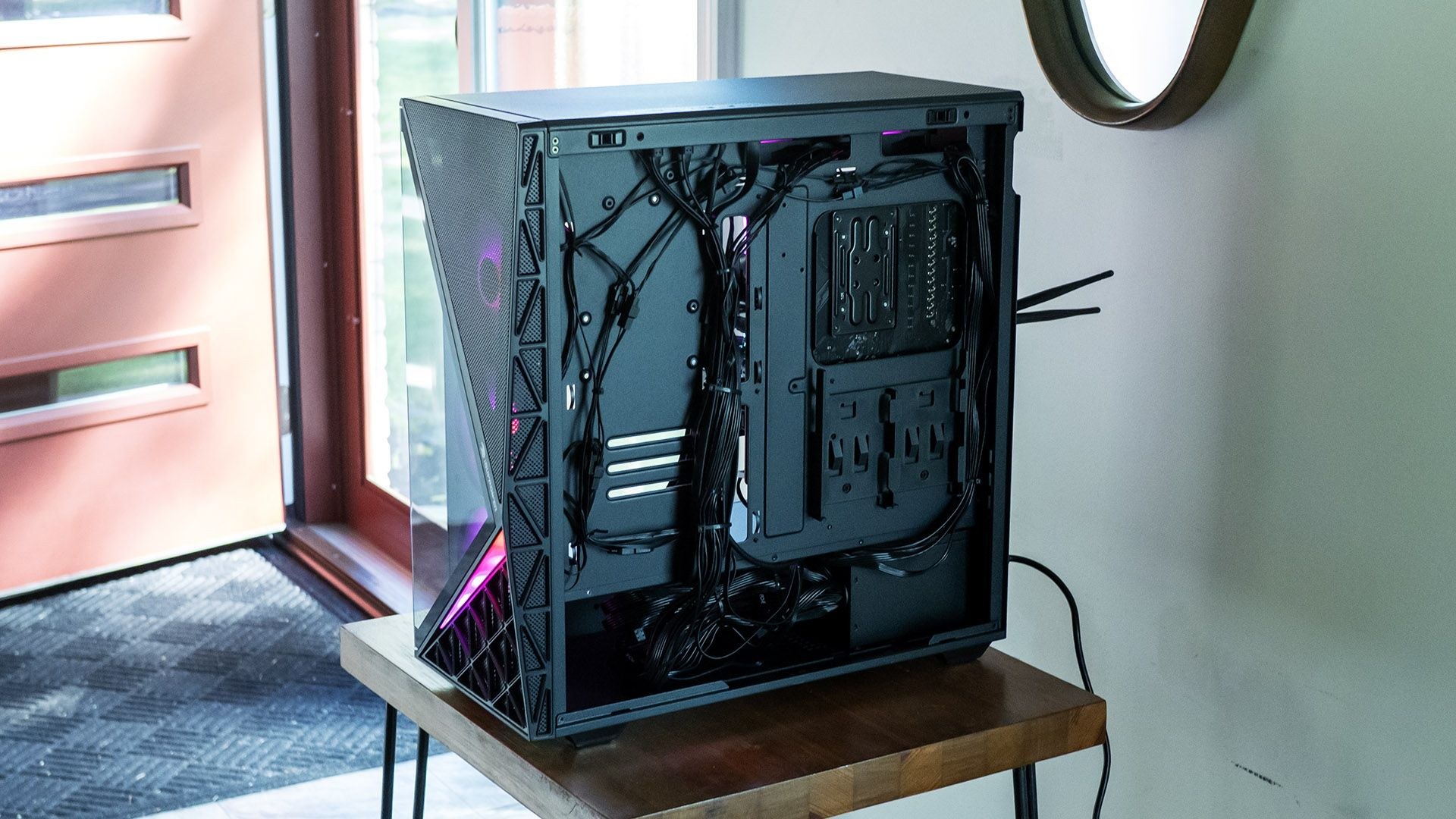
Mesh screening covers the remaining front and top surfaces, permitting adequate airflow and offering dust resistance, though the sole removable air filter sits beneath the bottom-mounted power supply. Inside, a blacked-out interior hosts an RGB light strip along the power supply compartment and up the front panel, with additional illumination from the two memory modules. The Asus Dual RTX 5070 in the review unit lacks its own lighting. The Hyte Nexus app controls all lighting, though not on an individual component basis.
Specifications and Connectivity
- Processor: Ryzen 7 7700X3D
- Graphics: Nvidia GeForce RTX 5070 (Asus Dual Gaming OC; 12GB GDDR7, 2,542 MHz boost clock)
- Memory: 32GB DDR5-5200
- Storage: 1TB PCIe 4.0 SSD (Patriot P410)
- Motherboard: ASRock B650M-CX
- Cooling: 360mm liquid cooler with LED display
- Power Supply: 750-watt non-modular
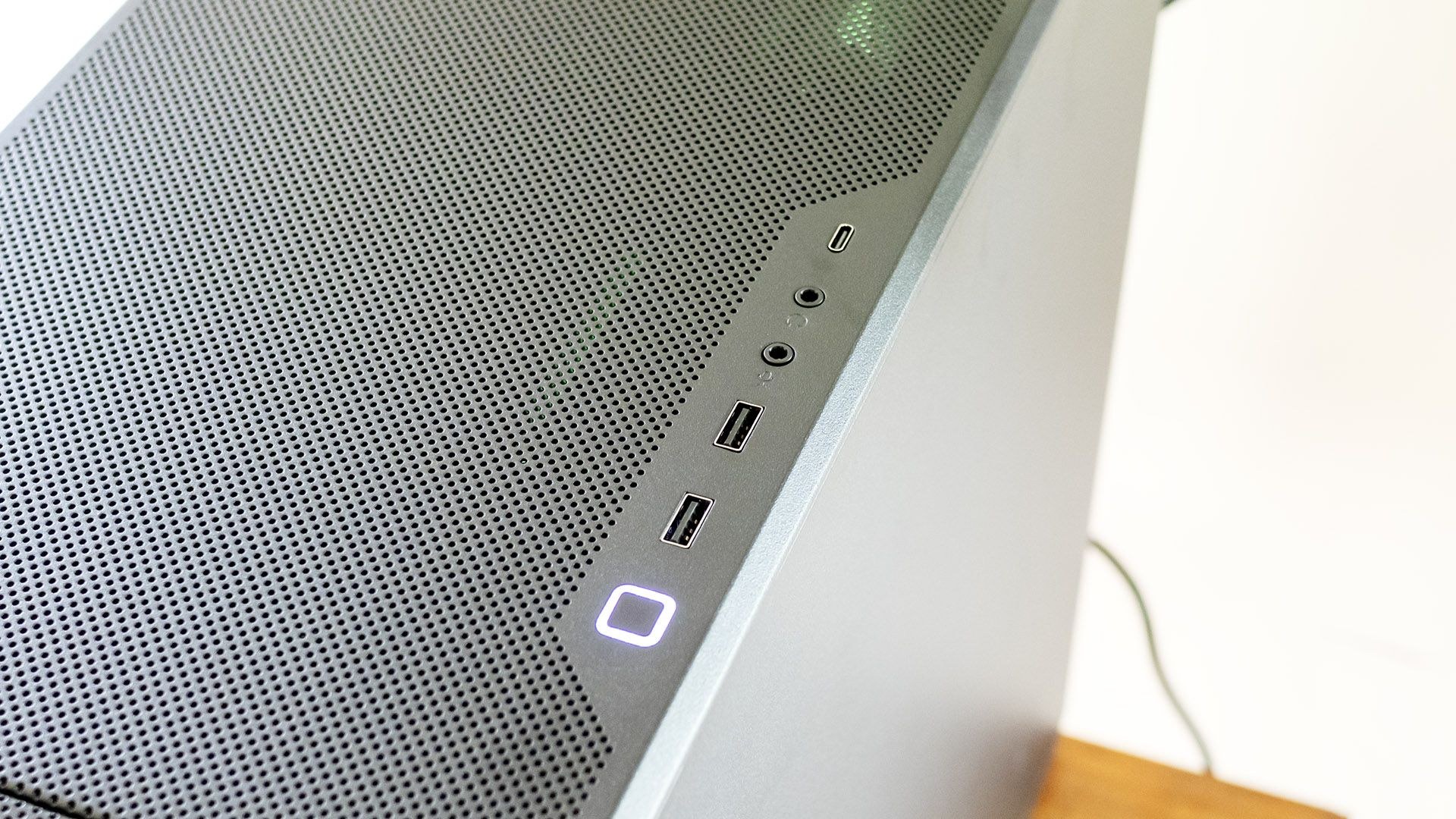
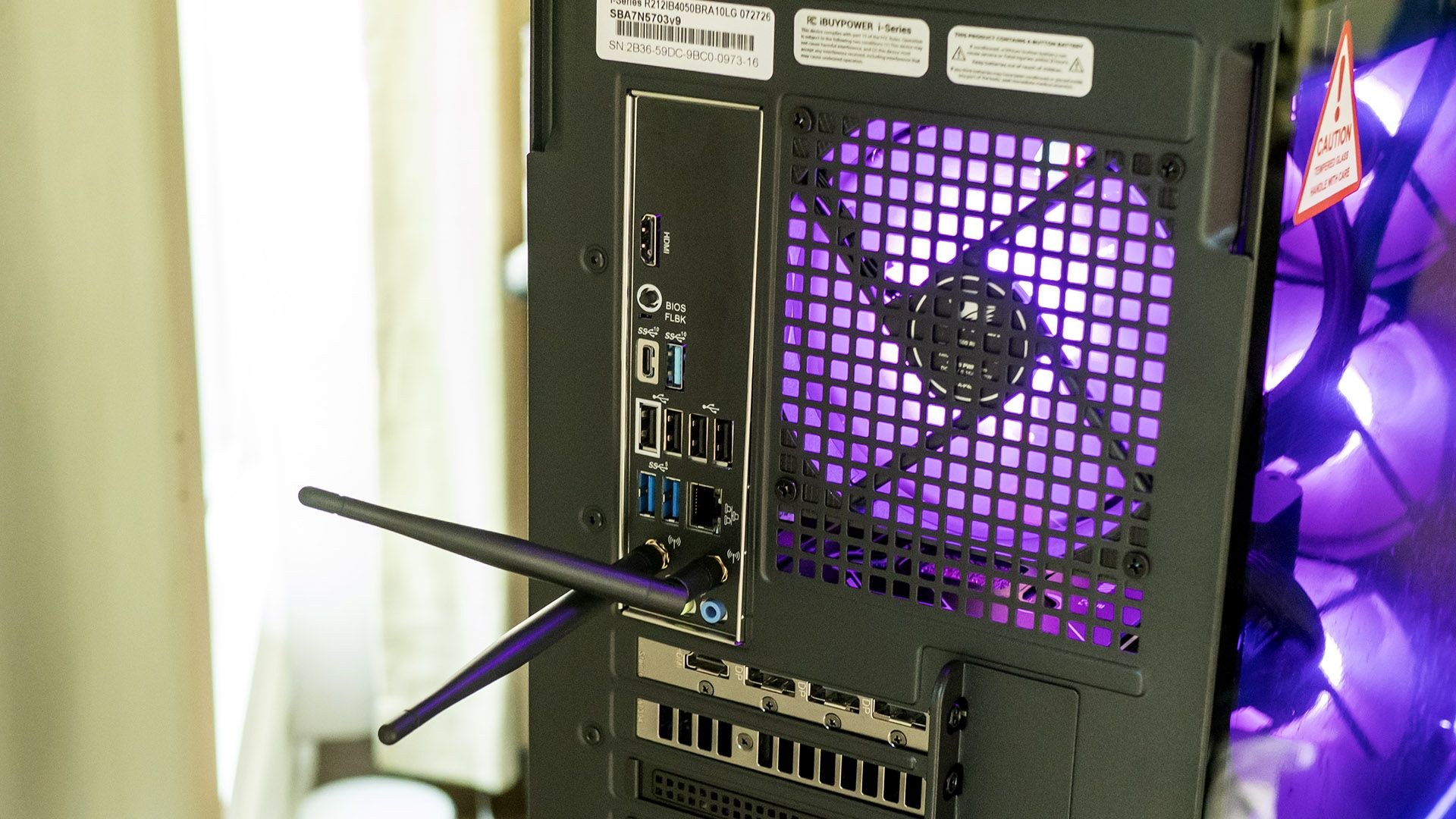
Front ports mounted on top include one USB-C and two USB-A (all 5 Gbps) alongside separate headphone and microphone jacks. This positioning works best when the desktop sits on the floor rather than a desk. The ASRock B650M-CX motherboard on the rear provides one USB-C 3.2 (10 Gbps), one USB-A 3.2 (10 Gbps), two USB-A 3.2 (5 Gbps), four USB 2.0, Ethernet, HDMI, and audio jacks. Wi-Fi 6E and Bluetooth are included, though antennas require connection for adequate range.
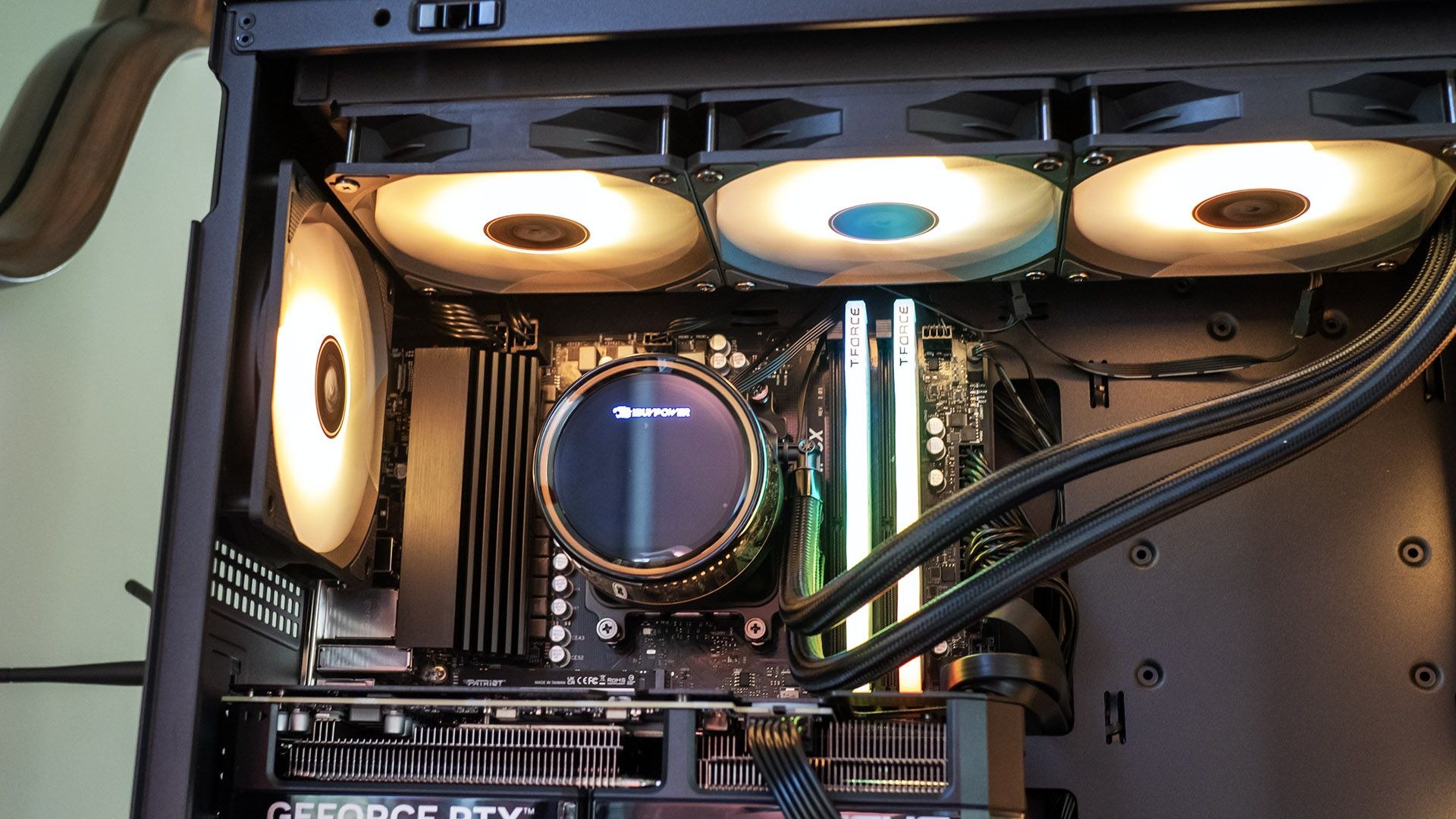
Side panels release with a tug at the top rear, hinging outward. Seven 120mm fans—three front, three atop the 360mm CPU radiator, and one rear—ensure plentiful airflow. Cabling remains reasonably organized, though the non-modular power supply leaves a substantial bundle of unused cables. The CPU cooler features an LED display showing temperature, frequency, and load; the display cannot be customized but can be toggled off through Hyte Nexus.
Expansion includes one open PCIe x16 slot and four DIMM slots, with two unpopulated. The motherboard offers two M.2 2280 drive slots and two 2.5-inch drive sleds behind the motherboard, but no 3.5-inch drive accommodation.
Gaming Performance
At 4K resolution with High settings and DLSS enabled, 007: First Light delivered between 60 and 70 frames per second in outdoor scenes and approximately 80 FPS indoors. Without DLSS, performance dropped to roughly half those figures.
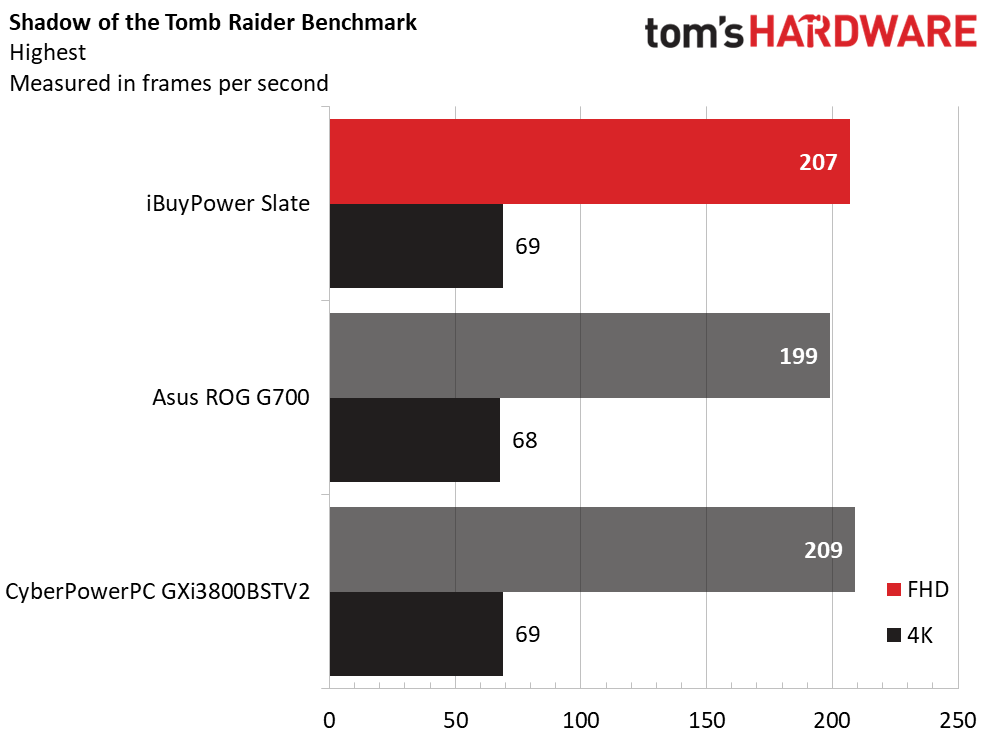
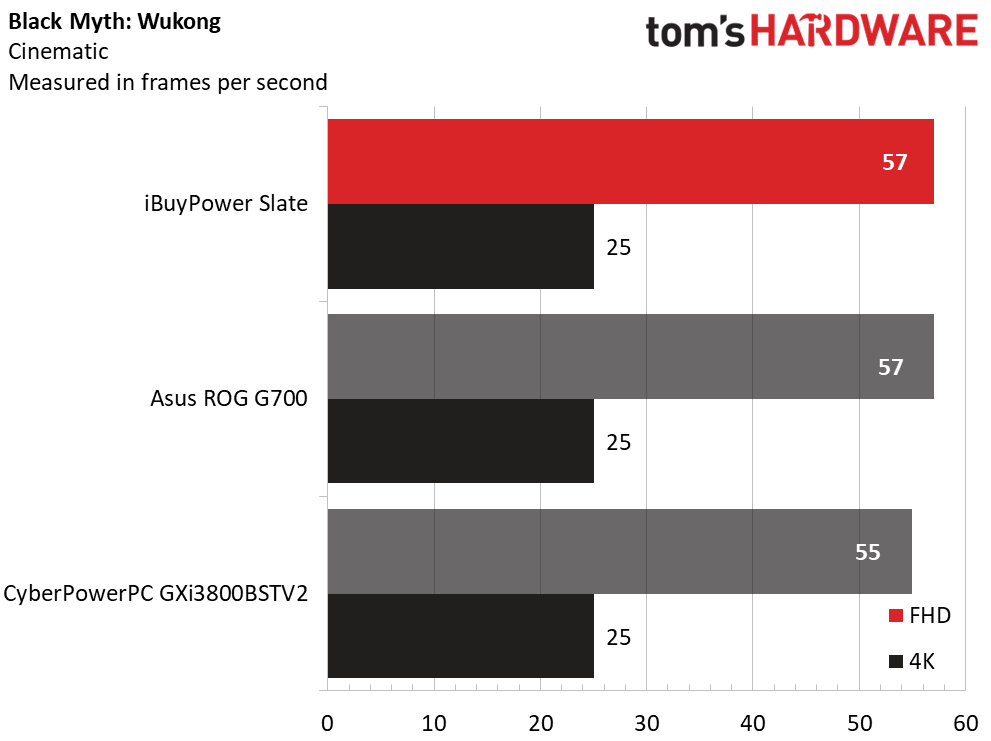
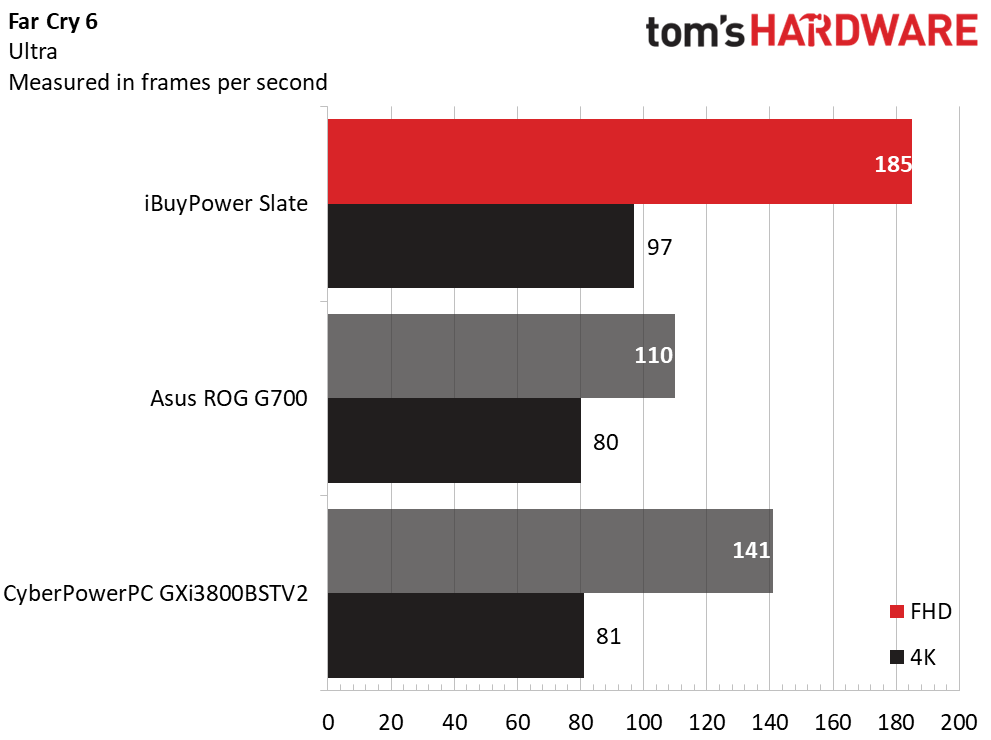
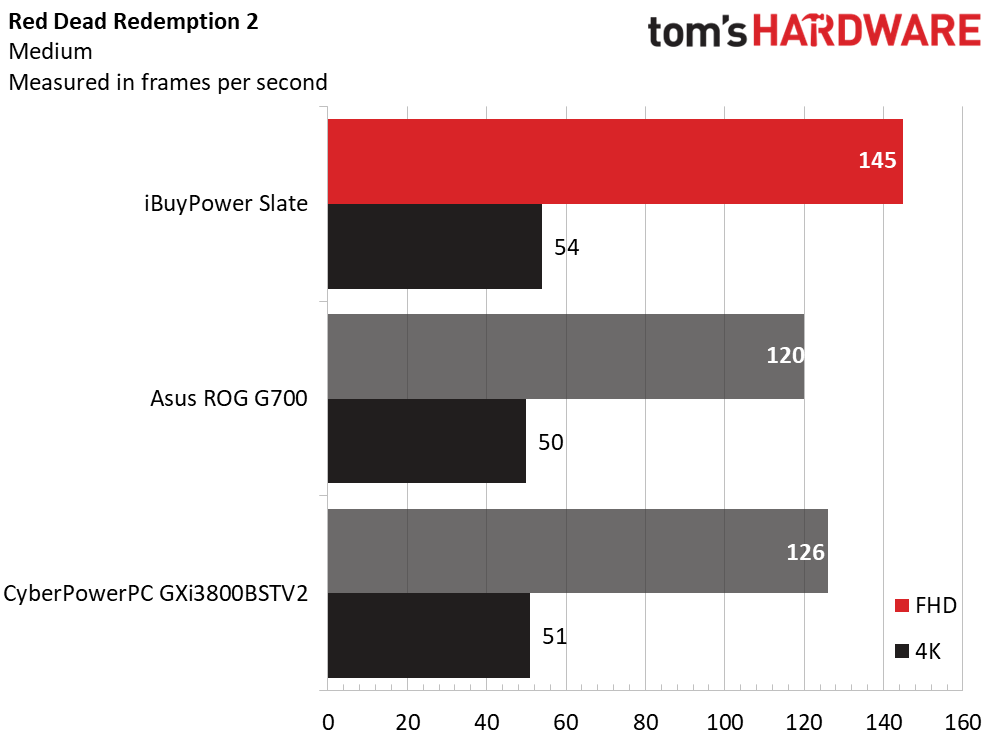
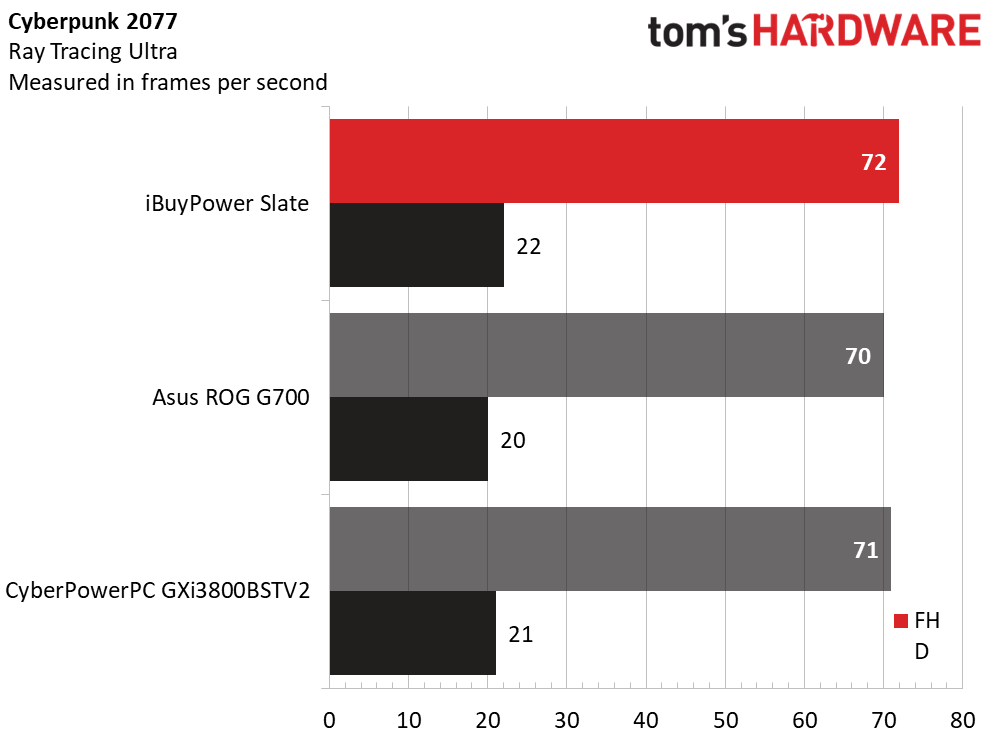
Compared against the Asus ROG G700 (Core Ultra 7 265KF, RTX 5070, $2,029.99) and the CyberPowerPC Gaming Desktop GXi3800BSTV2 (Core Ultra 7 270K Plus, RTX 5070, $2,309.99), both equipped with the same GPU but Intel processors, the Slate demonstrated competitive 1080p gaming. It matched both rivals in Shadow of the Tomb Raider (Highest settings), Cyberpunk 2077 (Ray Tracing Ultra), and Black Myth: Wukong (Cinematic). The Ryzen 7 7700X3D's strengths emerged in Far Cry 6 (Ultra), where it achieved 185 FPS compared to 110 FPS on the Asus and 141 FPS on the CyberPowerPC. Red Dead Redemption 2 showed similar advantages, with the Slate posting 145 FPS against 120 FPS and 126 FPS respectively.
At 4K, the Slate largely matched its competitors, an unsurprising outcome since 4K gaming remains GPU-bound and all three systems use the same RTX 5070. Far Cry 6 proved the exception, where the Slate delivered 97 FPS versus 80 and 81 FPS from the Asus and CyberPowerPC.
Stress testing via 15 loops of Metro: Exodus at RTX settings showed highly stable performance, averaging 145.7 FPS with less than one frame variance across all runs. The Ryzen 7 7700X3D maintained an average temperature of 43 degrees Celsius and average clock of 4.29 GHz. The RTX 5070 ran at 64 degrees Celsius with an average core clock of 2.64 GHz. Fan noise ramped up noticeably during CPU stress but remained relatively quiet during gaming and barely noticeable during daily use.
Productivity and General Performance
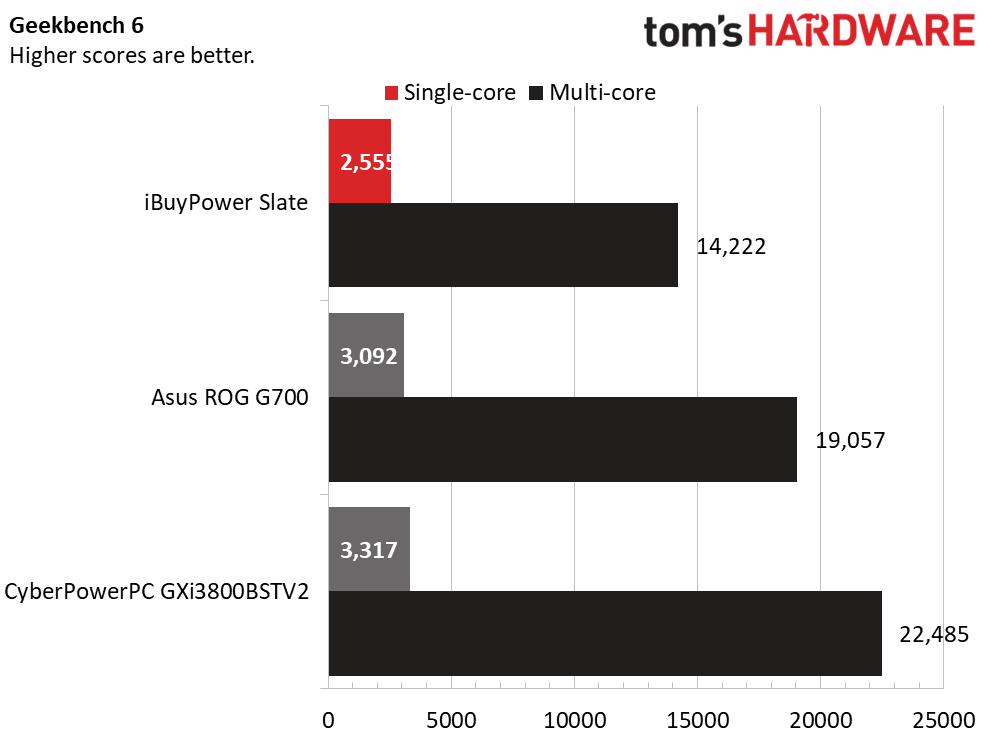
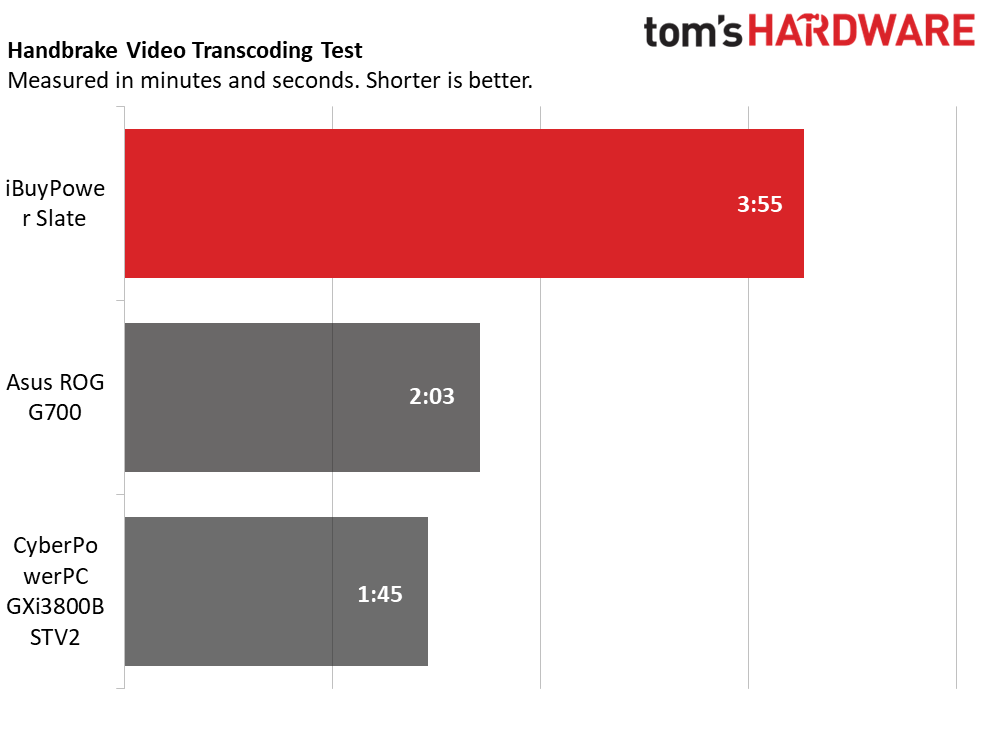
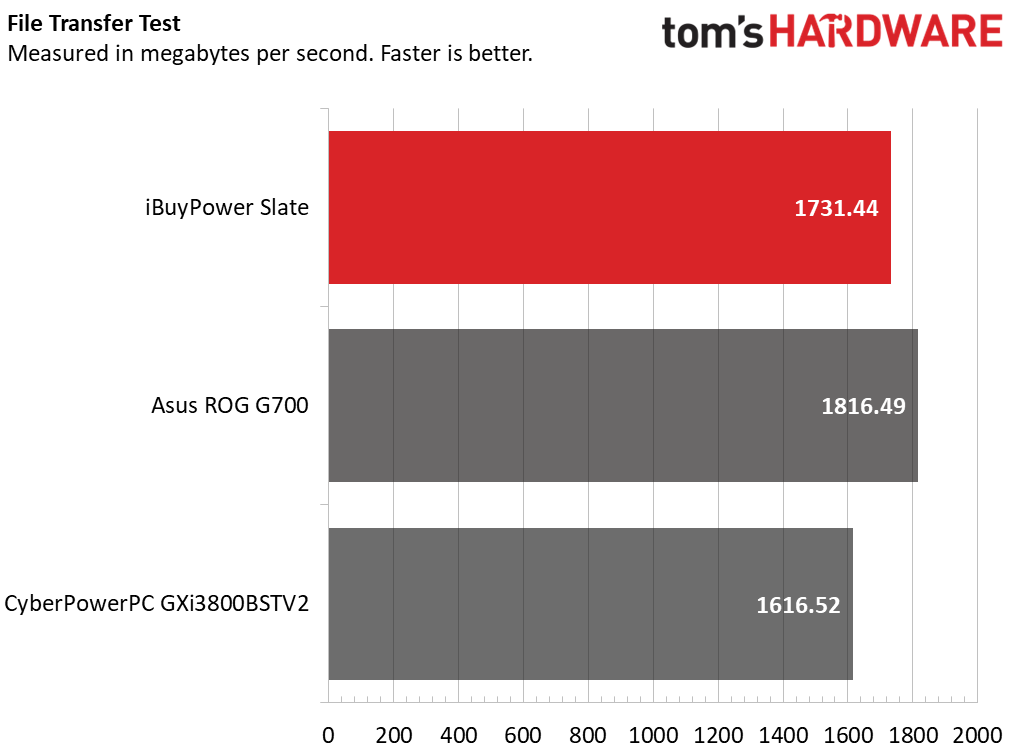
Productivity performance represents a weak point for this configuration. While the Ryzen 7 7700X3D remains capable for gaming, its eight-core previous-generation architecture falls behind the Core Ultra 7 K-class chips in both competing systems, particularly the CyberPowerPC's Core Ultra 7 270K Plus. The performance gap proved substantial: the iBuyPower system scored 14,222 in Geekbench multi-core versus 22,485 for CyberPowerPC. In a 4K to 1080p Handbrake transcoding test, the Slate required 3 minutes 35 seconds compared to 2 minutes 3 seconds for the Asus and 1 minute 45 seconds for the CyberPowerPC. The system proved competitive in a 25GB file transfer test, demonstrating its storage drive performs adequately.
Despite this performance gap relative to Core Ultra 7 systems, the Slate remains highly capable for daily productivity and moderate content creation such as video editing. Only users demanding maximum CPU performance would find compelling reason to pursue a more powerful processor than the Ryzen 7 7700X3D.
Included Peripherals
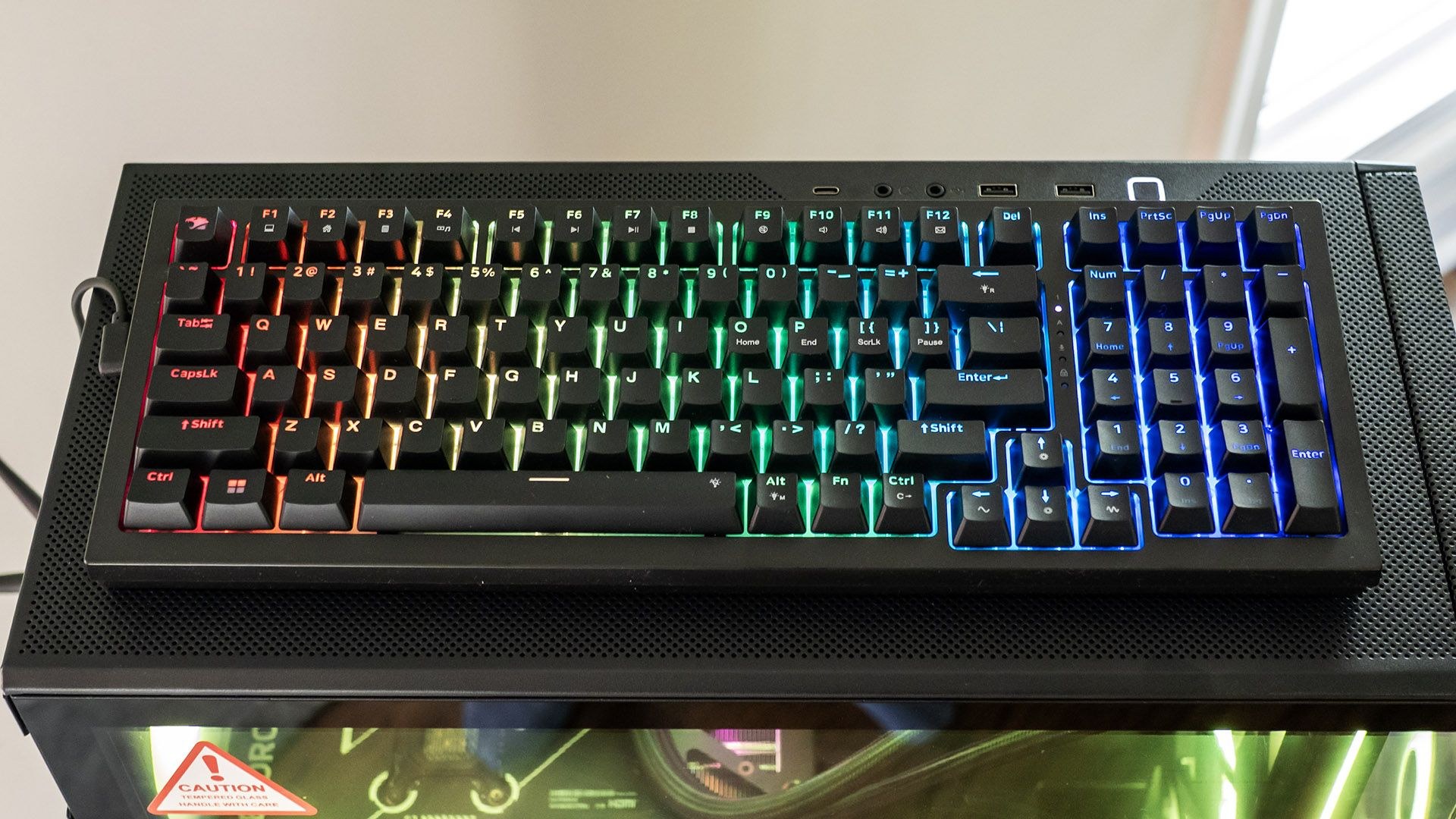
The Slate includes peripherals that exceed typical bundled offerings. The mechanical keyboard stands out as the highlight. Though specifications don't identify the switch type, it feels like linear switches favored by gamers for their predictability. Testing revealed a solid, not overly loud feel. RGB backlighting covers the entire keyboard rather than individual keys, configurable through Hyte Nexus for various colors and patterns. Keyboard shortcuts also control lighting: Fn+Ctrl cycles colors, Fn+Left/Right arrows adjust brightness, Fn+Space Bar disables lighting, and Fn+Alt cycles through 16 backlighting patterns including breathing, pulsing, and steady. The keyboard uses a detachable USB-C cable.
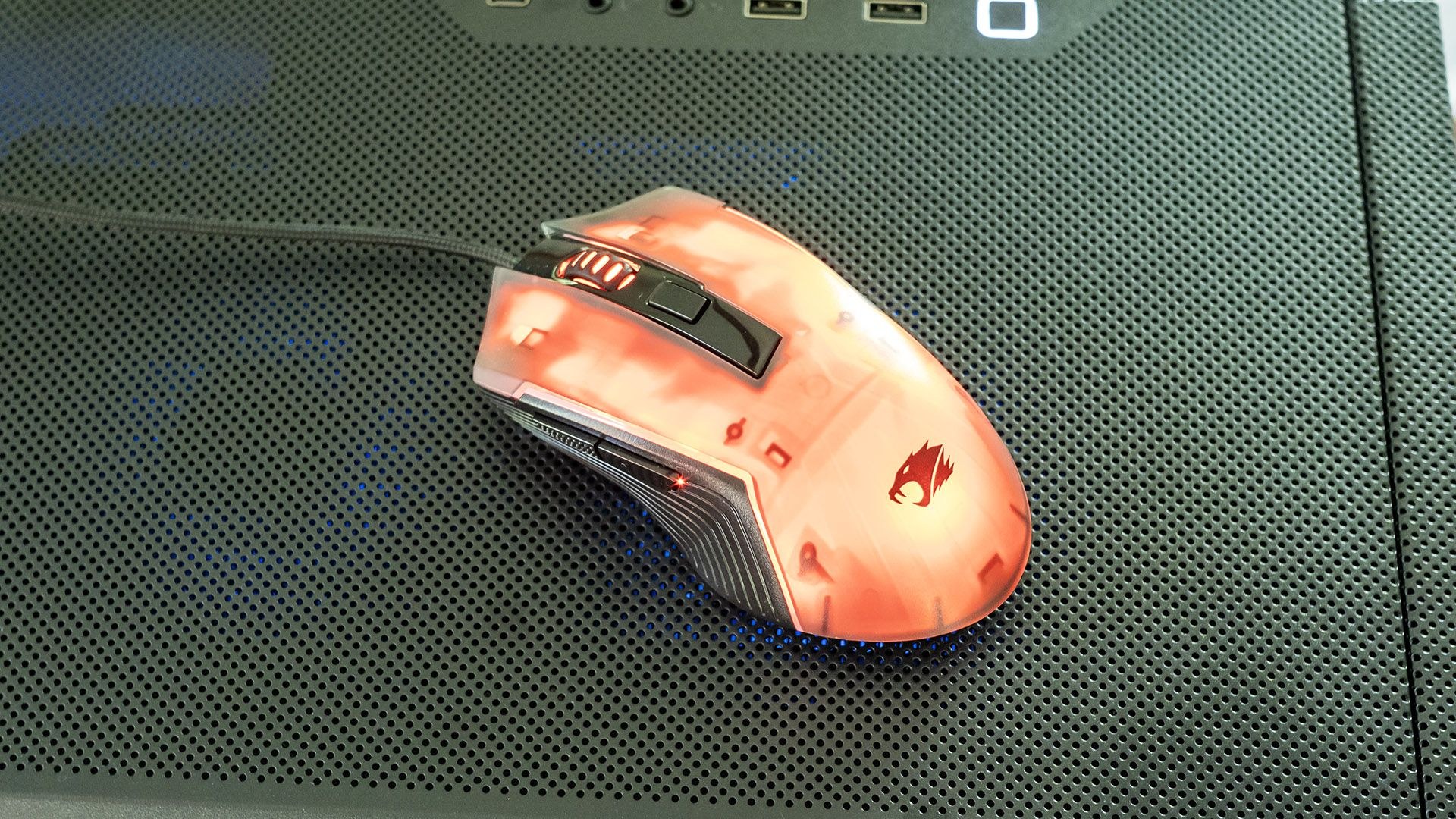
The mouse also exceeds average quality but accommodates right-handed users only. Standard buttons provide solid feedback, with two side buttons and a notched scroll wheel. A DPI button behind the scroll wheel switches between 1,200, 2,400, 3,500, 5,500, and 7,200 DPI, with visual indication through the button illuminating in red, blue, green, purple, and yellow respectively. The mouse fits medium-size hands well. Internal RGB backlighting can be configured through Hyte Nexus or toggled through 10 modes via an underside button, with patterns including color streaming, steady, and breathing.
Software and Warranty
Beyond standard Windows 11 applications, iBuyPower preloads only Hyte Nexus. The app provides basic component temperature and frequency monitoring, but its primary function is RGB lighting control. The interface proves confusing—component tiles like the case appear in the menu but have no effect since the Slate's case isn't recognized. All functionality concentrates in the Lighting section. Numerous preset lighting recipes exist, including Rainbow, Aurora, Ice, Fireplace, and Forest, which apply to keyboard and mouse as well. Options for screen mirroring, audio visualization, and static colors are available, with settings saveable in profiles.
A significant limitation is the absence of per-component lighting control—colors and patterns apply universally to all components since they connect to a single ARGB header. The app confusingly permits adjustments to other headers despite nothing being connected to them. Clearer indication that those headers lack connections would have improved usability. Despite this constraint, the Slate permits reasonable lighting customization without requiring an advanced lighting controller that would have increased cost.
iBuyPower provides a one-year parts and labor warranty.
Configuration Options
Beyond the reviewed configuration featuring a Ryzen 7 7700X3D, RTX 5070, 32GB DDR5-5200 RAM, and 1TB PCIe 4.0 SSD with included mechanical keyboard and mouse, Best Buy offers several variations. A $1,679.99 entry model includes a Core i7-14700F and RTX 5060. A $1,799.99 option steps up to a Core Ultra 7 265F and RTX 5060 Ti. Above the reviewed model, a $2,299.99 variant includes a Ryzen 9 9900X3D. The range-topping $2,999.99 configuration offers a Ryzen 9 7900X, RTX 5080, and 2TB SSD.
Verdict
The Slate executes the mid-tier gaming desktop formula nearly flawlessly. Visually, its RGB lighting appears attractive and reasonably configurable despite lacking per-component control. The RTX 5070 and Ryzen 7 7700X3D comfortably handle today's games at 1080p and 1440p, with 4K achievable through reduced visual quality or DLSS. iBuyPower exceeds expectations by including a liquid CPU cooler with an integrated screen and by bundling a mechanical RGB keyboard and gaming mouse.
The Slate's weakness, at least in the reviewed configuration, lies in processing power. Though the Ryzen 7 7700X3D excels at gaming, it underperforms Core Ultra 7 K-class chips for general use—capabilities available in similarly priced systems. For gamers focused purely on frame rates, however, the Slate delivers solid performance.